Not a remote desktop. Not a web IDE. A real native Linux environment running directly on your phone's hardware. Compile Android apps with Gradle, deploy to Vercel, send SMS from scripts, take photos from the command line, run AI agents that answer your calls while you sleep. Connect multiple phones into a mesh network. 80 Android permissions, 90+ hardware commands, 22+ built-in platform CLIs. One APK, no laptop, no server.
Every screenshot below was taken on a Samsung Galaxy S24. This is what MobileCLI actually looks like.
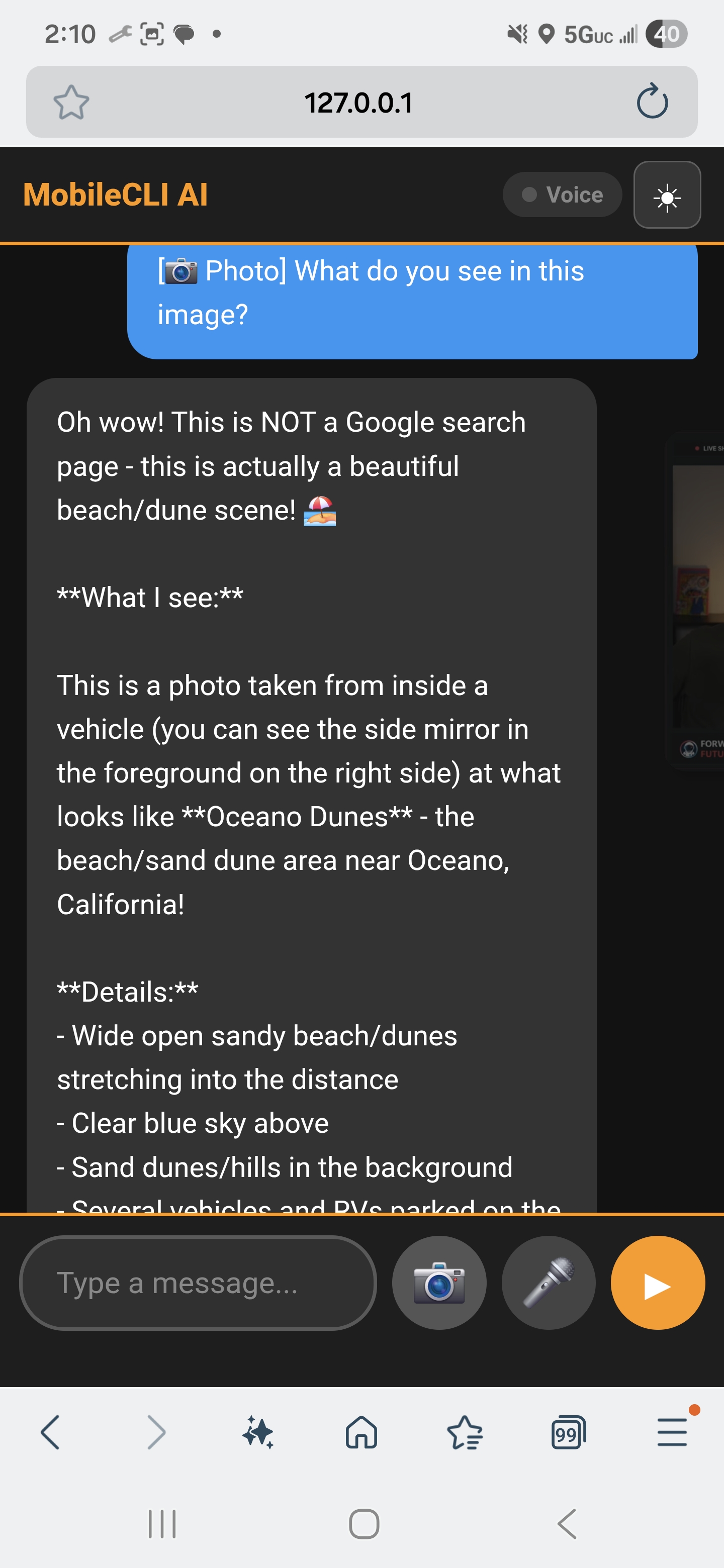
Take a photo — AI sees and describes it in real time
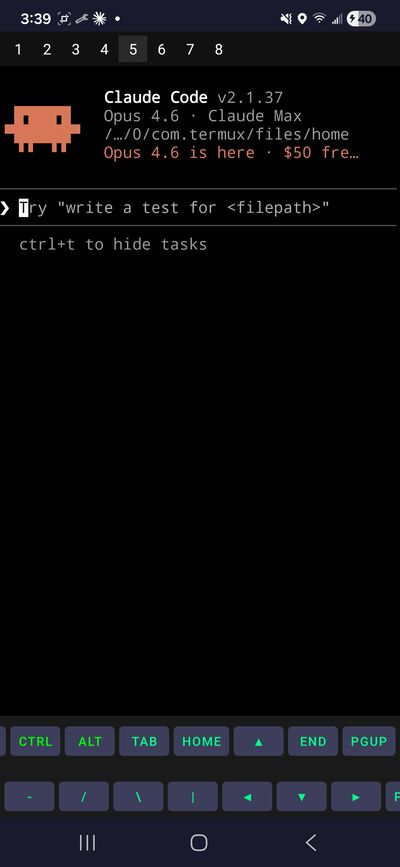
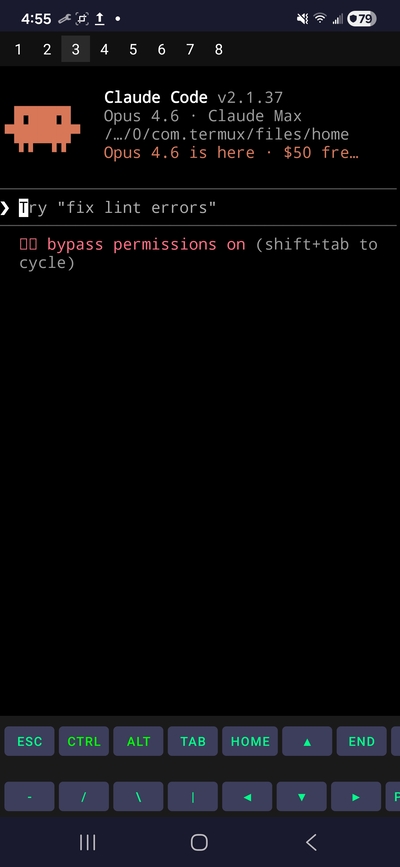
Anthropic's AI — Opus 4.6, Claude Max, 8 sessions
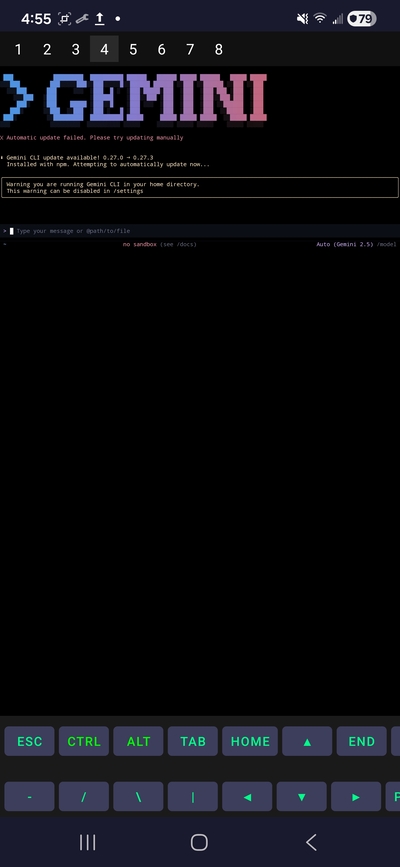
Google's AI — Gemini 2.5, ready to code
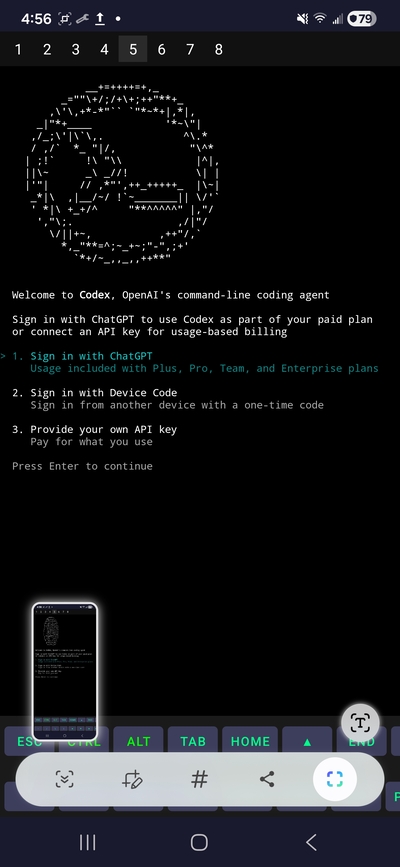
OpenAI's AI — use your subscription or API key
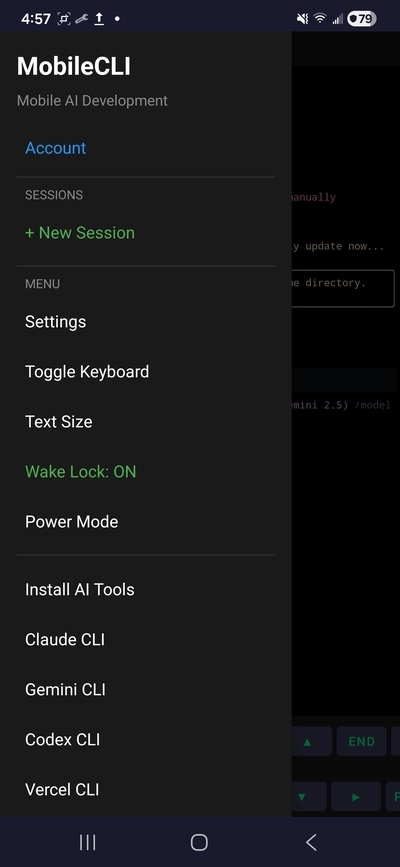
Settings, sessions, and every tool from the drawer
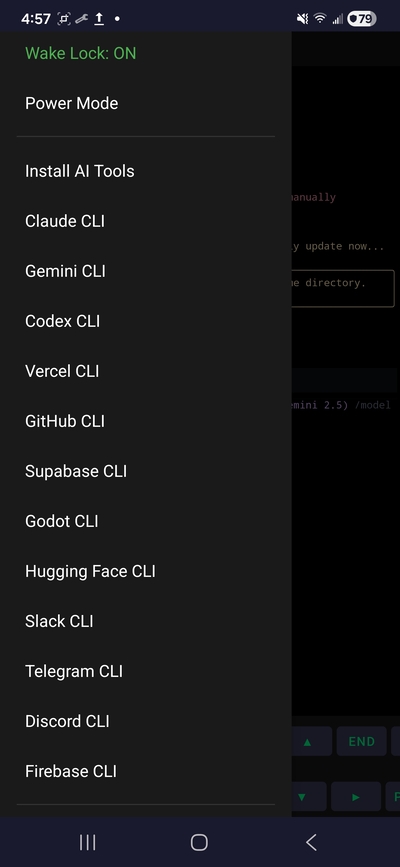
GitHub, Vercel, Firebase, Supabase, Godot, and more
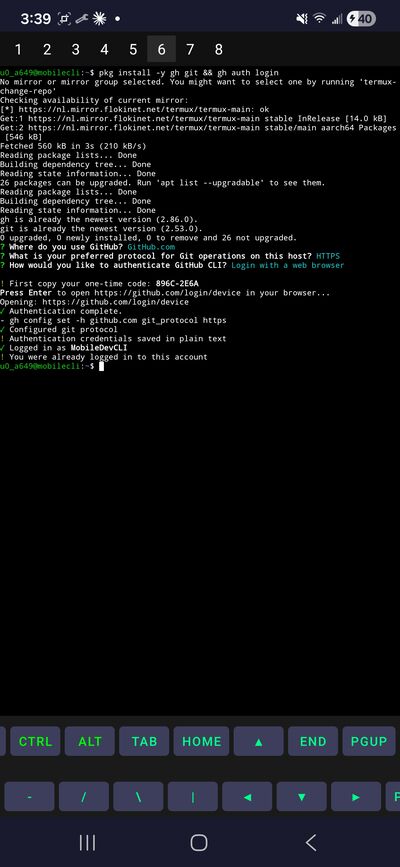
Full OAuth — not API tokens, real verified sessions
Download the APK. Open it. A setup wizard extracts a full Linux filesystem, installs Python, Node.js, Git, Java 17, Gradle, and 22+ platform CLIs — Claude, Gemini, Codex, GitHub, Vercel, Firebase, Godot, Twilio, and more. About 5 minutes, fully automatic.
Launch Claude, Gemini, or Codex from the menu. They can read your files, write code, run commands, and deploy — all from the terminal. Use your existing subscription or API key.
Android apps, websites, games, AI agents, bots, APIs. Deploy to Vercel, Firebase, GitHub Pages. The same tools professionals use on their laptops, in your pocket.
Most mobile dev tools are simplified apps, toy IDEs, or remote connections to a real computer. MobileCLI is the real thing — a native environment that runs entirely on your device.
Log into GitHub, Vercel, Firebase, Heroku, Netlify, and dozens more with full authenticated sessions — not limited API tokens, not browser cookies. Real OAuth, SSH keys, and encrypted connections. Your credentials stay on your device. No middleman. No third-party servers.
Use your existing Claude Max, ChatGPT Plus, or Gemini subscription — or pay API pricing for exactly what you use. Either way, you get 100% of the AI's capabilities, not the limited web version. Three AI assistants, one device, your choice of plan.
Mobile apps give you 10% of what a service can do. The CLI gives you 100%. Every feature, every flag, every option — nothing hidden behind a GUI. When you log into GitHub from the CLI, you can do everything — not just what an app decides to show you.
There is no ceiling. No locked features. No "upgrade to pro." The entire environment is yours. Install PostgreSQL, Redis, nginx, Rust, Go, Ruby. Compile from source. Write your own tools. If it runs on Linux, it runs here.
Everything below happens locally. No remote servers. No cloud VMs. Your phone is the computer.
Java 17, Kotlin, Gradle, aapt2, d8, apksigner — the full Android build toolchain runs natively on your phone. Write code, compile, sign, and install APKs without ever touching a computer. MobileCLI itself was built this way. The AI inside the app modified the app's source code, compiled a new APK, and handed it back. On a phone.
Type vercel --prod and your site is live in 10 seconds. The website you're reading right now — mobilecli.com — is designed, updated, and deployed entirely from this phone. React, Next.js, static sites, serverless functions. Vercel, Firebase, Netlify, Fly.io, Heroku. Real production deployments with real domains.
Claude Code (Anthropic), Gemini CLI (Google), and Codex CLI (OpenAI) are all pre-installed. These aren't chatbots — they're autonomous coding agents. They read your entire project, write code across multiple files, run tests, fix errors, commit to Git, and deploy to production. In one session today, Claude wrote 2,969 lines of Python, a 525-line Kotlin Android activity, and deployed a full website — with zero errors.
The GitHub CLI gives you everything. Clone repos, create branches, commit, push, open pull requests, review code, manage issues, create releases with attached binaries. Authenticated with real OAuth — not a limited token. The developer behind MobileCLI manages 66 private repositories entirely from this phone.
Godot 4 game engine included. Build games and export to Android, iOS, Web, Windows, Mac, or Linux. Full game development, from concept to published app, on your phone.
90+ commands that turn your phone into a programmable device. sms-send sends a real text. camera-photo fires the camera. location returns GPS coordinates as JSON. sensor -s accelerometer reads motion data. infrared-transmit controls your TV. torch on turns on the flashlight. fingerprint triggers biometric auth. Every command returns structured JSON. Every one is scriptable.
PostgreSQL, MariaDB, Redis, SQLite — actual database servers running on your phone. Real databases for real development. Not cloud-only managed services.
This is the one that breaks people's brains. AI running inside MobileCLI can clone the app's own source code, modify the Kotlin, recompile with Gradle, sign a new APK, and hand it to you. The app literally rebuilds itself. MobileCLI has gone through 30+ versions this way — each one built by AI running inside the previous version, on a phone, with no computer involved at any point.
MobileCLI isn't just a terminal. It's a full AI agent with a SecurityEngine, 9 skill engines, 9 communication gateways, a 14-screen web console, and an always-on daemon. Screen Agent reads and controls any Android app through accessibility. Browser Agent injects an AI overlay on any web page. Vision analyzes screenshots with Claude. The agent monitors texts, answers calls, controls hardware, and runs autonomously — all on your phone.
The agent runs as a background daemon. It polls your communication channels every few seconds — checking for new SMS messages, Twilio calls, Telegram messages, Discord pings. When something comes in, it routes the message through an AI brain that understands context, channel constraints, and your preferences.
The brain supports multiple AI models. Claude Sonnet is the default. If Claude is unavailable, it falls back to Gemini automatically. The brain is channel-aware: it knows SMS caps at 160 characters, WhatsApp allows 4,096, Discord allows 2,000. It adjusts every response to fit.
When the agent needs to take action, it uses skills — modular capabilities that map to your phone's hardware. The SMS skill sends texts. The voice skill uses speech-to-text and text-to-speech. The hardware skill controls the flashlight, IR blaster, and sensors. The scheduler runs tasks on a timer.
No ports are exposed. No cloud server in the loop. Every gateway uses outbound polling — the phone never accepts inbound connections. Your conversations and data stay on your device.
Call your Twilio number and have a full conversation with AI. Say "create a shopping list" and it writes the file. Say "turn on the flashlight" and it does it. Two-way voice control of your entire phone — new in v8.3.
When you're busy, the agent reads your incoming texts and replies intelligently on your behalf. It knows your context, your schedule, and your tone. Not a canned response — a real conversation.
Use your phone's IR blaster to control TVs and appliances. Send commands via text message. "Turn off the living room TV" — the agent parses it and fires the right IR signal.
Schedule health checks for your websites and APIs. If something goes down, the agent texts you immediately. It can even attempt auto-recovery by hitting restart endpoints.
The agent can read your GPS and respond to questions like "where's the nearest coffee shop?" or log your location at intervals for trip tracking — all processed locally.
Schedule a morning summary. The agent checks your calendar, reads the weather, scans your GitHub notifications, and sends you a single digest message before you even open the app.
Use the camera and sensors as a motion detector. The agent monitors for changes and sends you an alert with a photo if something triggers. No cloud camera subscription needed.
Say "hey mobile" and dictate a note, reminder, or idea. The agent transcribes it, processes it with AI to clean up grammar and structure, and saves it to a file you can access later.
Run a single AI that responds across SMS, Telegram, Discord, and WhatsApp simultaneously. Same brain, same personality, every platform — managed from one phone.
Three AI interfaces that work across your phone. AI Widget: floating chat overlay on any app. Screen Agent: reads and controls any Android screen via accessibility (click, type, scroll, navigate). Browser Agent: native WebView that auto-injects an AI widget on every web page. Plus Vision — the AI can see your screen.
Draggable bubble that expands to a full chat window. Works over any app — reply to AI while browsing, reading, or coding. Tap the bubble to open, drag to reposition, swipe to dismiss.
Take photos directly from the widget and get AI analysis in the chat. Point your camera at anything — code on a whiteboard, a bug on screen, a receipt — and the AI describes what it sees.
Speech-to-text input and text-to-speech responses. Hands-free operation with a continuous listen-process-speak loop. Skip, pause, or stop at any time.
The widget UI is TypeScript compiled with esbuild. During development, it polls for changes every 5 seconds and reloads automatically. WebView + native Kotlin bridge, 17 JS methods, 14KB bundle.
Give your phone a goal. It decomposes it into tasks, spawns parallel AI agents in separate terminal tabs, and coordinates them through the Agent Bridge — a filesystem-based protocol with task management, lock arbitration, and 2/3 majority consensus voting. Each agent gets a full 200K context window. Claude implements, Gemini reviews, Codex plans.
mcli-bridge task create "build weather app" — creates a task that any agent can claim. mcli-bridge consensus create triggers a vote. 2/3 majority auto-resolves. Heartbeats, locks, and message queues — all filesystem-based.
mcli-new-tab "command" — shell scripts can programmatically create new terminal sessions. Each agent gets its own isolated tab with full context.
Each agent works on its own feature branch. When done, mcli-swarm merge combines all work. File-based status tracking at ~/.mobilecli/swarm/.
VS Code and Cursor Agent run via proot-distro Ubuntu. One-tap launch from the app drawer. Full IDE experience on your phone — code-server on localhost.
Turn any MobileCLI phone into a node in a peer-to-peer mesh network. Execute commands on remote devices, transfer files, read hardware sensors across phones, and coordinate AI agents — all over WiFi with SSH key-based authentication. No cloud. No server. Just phones talking to phones.
mcli-mesh scan pings your local network and probes every IP for MobileCLI's SSH service on port 8022. Discovered peers show up with their hostname and latency. mcli-mesh pair does a bidirectional SSH key exchange — both phones trust each other instantly.
Once paired, you can run any command on the remote phone: mcli-mesh exec peer "termux-battery-status" returns the other phone's battery as JSON. mcli-mesh hw peer photo fires the remote camera. mcli-mesh send peer file.zip transfers files via SCP. mcli-mesh sync peer ~/project uses rsync for full directory synchronization.
Every operation is logged with timestamps and latency. The mesh is fully autonomous — AI agents on one phone can query hardware on another. A phone sitting on your desk becomes a remote sensor, camera, or compute node that any agent can reach.
~/.mobilecli/mesh/peers.jsonmcli-mesh hwmcli-mesh hw peer photo fires any paired phone's camera. Set up multiple phones as security cameras, time-lapse rigs, or multi-angle photo captures — all triggered from one terminal.
Check battery, WiFi, storage, and sensor data across every phone in your mesh with a single loop. Build a dashboard script that polls all peers every 60 seconds.
Run Claude on Phone A, Gemini on Phone B. Each agent can reach the other phone's hardware. Coordinate via Agent Bridge. Two brains, two sets of sensors, one mesh.
mcli-mesh sync peer ~/project uses rsync to keep codebases in sync across devices. Work on your tablet, sync to your phone, deploy from either.
You write code. You test it. You deploy it. You manage your repo. The AI helps when you're stuck. All in one terminal, all on your phone.
Every tool below is pre-configured and ready to use. Plus install anything from the Linux ecosystem — PostgreSQL, Redis, nginx, Go, Ruby, and thousands more.
Everything below was created using MobileCLI and AI. No PC was involved at any stage.
A complete SDF raymarching game engine. No meshes, no textures, no audio files — everything is math. 9 interconnected systems: chunk streaming, entity system, multiplayer, economy, AI scriptable runtime, procedural audio, and more.
86 source files. 14 autoloads. Built in 18 minutes by Claude Code running inside MobileCLI on a phone.
A post-apocalyptic 3D open world with real-time combat, resource gathering, and exploration across 6 biomes. Built with Three.js, playable right here in your browser.
Claude had full control inside the project: designing levels, writing 2,300+ lines of game code, debugging physics, building AI enemies and a day/night cycle. Start to finish, on a phone.
Most phones today have hardware comparable to a laptop from a few years ago. Similar CPU cores. Similar RAM. Similar storage. Plus cellular, GPS, cameras, and sensors that laptops typically don't have.
The main difference was software. Phones ran apps for consumers. Laptops ran tools for builders. MobileCLI bridges that gap.
Build your startup's MVP on the train. Fix a production bug from bed. Deploy an update while waiting for coffee. Run an AI agent that manages your communications while you sleep. Connect multiple phones into a mesh and distribute work across devices. Your phone has more potential than you might think. MobileCLI helps unlock it.
7-day free trial. No credit card required. Pro subscription for continued access to all tools and AI assistants.
Pricing details available in the app.
mcli-mesh scan to find peers, mcli-mesh pair to exchange keys, then mcli-mesh exec peer "any command" to run commands on the other phone. You can read remote sensors, take photos on a remote camera, transfer files, and sync entire project directories. All encrypted, no cloud involved.mcli-bridge) provides filesystem-based coordination between Claude, Gemini, and Codex. They can create tasks, claim work, send messages, acquire locks, and vote on decisions via 2/3 majority consensus. Claude typically implements code, Gemini reviews for safety, and Codex plans architecture. The entire protocol is file-based — no servers, no APIs, just JSON files on disk.Questions, feedback, partnership inquiries, or just want to show us what you built.
Download MobileCLI and find out what your phone can really do.
v10.2.0 adds OACLI Agent System, Screen Agent, Browser Agent, Vision. v10.0.0 is lighter without AI features.